
This SEO guide for beginners explains how search engines work and what to do first. With it, you can bring steady, free traffic to your website. You do not need technical skills or a big budget. You need a clear order of work and the patience to follow it.
First, you will learn what SEO is and how Google and Bing find pages. Next, you will follow eight simple steps that matter most in 2026. Finally, you will get a 30-day plan you can start today.
Disclosure: this article contains affiliate links, including links to Fiverr and Hostinger. If you buy through them, I may earn a commission at no extra cost to you. Read my affiliate disclosure for details.
What Is SEO? A Simple Explanation for Beginners
SEO stands for search engine optimization. It is the practice of making your website easy for search engines to find, understand and show to the right people. When a page matches what someone is searching for, it can appear in the organic (unpaid) results.
Here is why it matters:
- Organic search can send visitors to your site every day without paying for each click.
- People who search for a topic are already interested in it, so they are often easier to help.
- A good page can keep working for months or years, unlike a social media post that fades quickly.
However, SEO is not instant, and nobody can promise you the first position. Google says this clearly in its own documentation. Strong results come from steady work on a few basics, and this guide covers them in order.
How Search Engines Find and Rank Pages
Search engines work in three main stages. Google explains them in detail in its guide to how Search works.
- Crawling: automated bots follow links to discover pages.
- Indexing: the search engine reads a page and stores what it finds.
- Ranking: when someone searches, the engine picks the best matching pages from its index and orders them.
As a result, a page that bots cannot reach will not rank. Linking your pages together and submitting a sitemap both help. Bing follows the same basic process, and it offers Bing Webmaster Tools for site owners. It also supports IndexNow, a protocol that tells participating search engines when your content changes.
Step 1: Set One Clear Goal
Before you change any settings, decide what success looks like. Pick one main goal for the next three months. For example, you might want 500 monthly visits from search, 20 newsletter sign-ups or 10 customer enquiries.
- Choose one goal: a focused target is easier to measure than a vague wish to “get more traffic.”
- Choose one metric: clicks, sign-ups or sales all work, as long as you track it.
- Know your reader: write down who they are and what questions they ask.
Both Google Search Console and Bing Webmaster Tools are free, so set them up on day one.
Step 2: Do Simple Keyword Research
A keyword is a word or phrase that people type into a search engine. Keyword research helps you find the phrases your audience really uses, so your pages answer real questions.
How to Find Beginner-Friendly Keywords
- Start with a seed topic, such as “email marketing” or “handmade candles.”
- Type it into Google and note the autocomplete suggestions and the “People also ask” questions.
- Check the related searches at the bottom of the results page.
- Use a free source such as Google Keyword Planner or the Search Console performance report.
- Choose specific phrases (long-tail keywords) because they are easier to compete for than short, broad ones.
Match the Search Intent
Search intent is the reason behind a search. If your page does not match it, the page will struggle to rank, even with perfect keywords. The table below shows the four common types.
| Intent | Example search | Best page type |
|---|---|---|
| Informational | how to start a blog | Guide or tutorial |
| Commercial | best email tools for beginners | Comparison or review |
| Transactional | buy running shoes size 9 | Product page |
| Navigational | Search Console login | Brand or login page |
Before you write, search for your keyword and look at the top results. If they are all step-by-step guides, a sales page will probably not fit. Once you know the basics, read my guide on how to build an SEO strategy from scratch. It shows how to turn keywords into a full plan.
Step 3: Create Helpful, Original Content
Google says its ranking systems aim to reward content that is helpful, reliable and written for people. Its guidance on creating helpful content is worth reading once. In practice, you can follow these habits:
- Answer the question early: give the main answer in the first paragraph, then add detail.
- Use short paragraphs and clear headings: readers scan before they read.
- Add something original: include your own examples, screenshots or lessons learned.
- Write naturally: use your keyword where it fits, and never force it into every sentence.
- Update old pages: fix facts that have changed and add new information.
There is no magic word count. Cover the topic fully, then stop. Do not copy other websites, because duplicate content gives readers no reason to choose you.
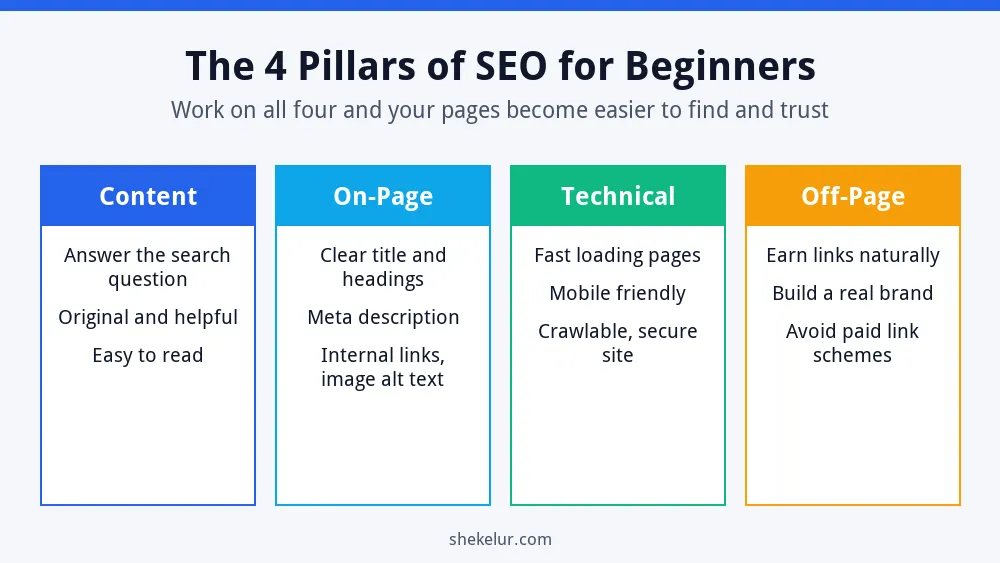
Step 4: Optimize Each Page (On-Page SEO)
On-page SEO means preparing each page so that both people and search engines understand it quickly. Start with these elements:
- Title tag: put the main keyword near the start and keep the title under roughly 60 characters so it is less likely to be cut off.
- Meta description: write one or two inviting sentences of about 150 characters. Google may rewrite it, but a clear one often helps.
- Headings: use one H1 for the title and H2 or H3 headings for each section.
- URL slug: keep it short and readable, such as /seo-guide-for-beginners/.
- Image alt text: describe each image in plain words, which also helps screen reader users.
- Internal links: link to related pages with descriptive anchor text.
For example, a page about homemade bread could use the title “Easy Homemade Bread Recipe: Step-by-Step Guide,” a heading that matches it and alt text such as “fresh homemade bread loaf on a board.” Google also explains how it builds title links, which helps when your titles are rewritten.
Want a deeper checklist? Read my step-by-step guide to on-page SEO for new websites and the best on-page SEO practices for 2026.
Step 5: Fix the Technical Basics
Technical SEO covers the behind-the-scenes work that helps search engines reach your pages and helps visitors enjoy them. A few checks go a long way:
- Speed: compress images, use modern formats such as WebP and avoid heavy plugins, and choose fast WordPress hosting. Test your pages with PageSpeed Insights.
- Mobile-friendly design: use a responsive theme and check key pages on a real phone.
- HTTPS: make sure your site uses a secure connection.
- Sitemap and robots.txt: submit an XML sitemap and do not block important pages by mistake.
- Indexing: use the Search Console page indexing report to spot pages that Google cannot index.
You should also know about Core Web Vitals, which measure loading, responsiveness and visual stability. According to web.dev, good targets are a Largest Contentful Paint within 2.5 seconds, an Interaction to Next Paint of 200 milliseconds or less, and a Cumulative Layout Shift of 0.1 or less.
| Metric | What it measures | Good target |
|---|---|---|
| LCP | How fast the main content loads | 2.5 seconds or less |
| INP | How quickly the page reacts to taps and clicks | 200 milliseconds or less |
| CLS | How much the layout jumps while loading | 0.1 or less |
Great content still matters most, but a slow or broken page can waste it.
Step 6: Earn Links the Safe Way (Off-Page SEO)
A backlink is a link from another website to yours. When earned naturally, links act like votes of trust. Therefore, focus on being worth linking to:
- Publish useful guides, checklists or original examples that others want to cite.
- Write genuine guest posts for relevant websites, with natural anchor text.
- Join industry communities and share your expertise, not just your links.
- List your business in trusted, relevant directories.
Avoid shortcuts. Buying links, swapping links at scale and building private blog networks break Google’s spam policies. Parasite SEO can also look tempting. Before you try it, read whether parasite SEO is still effective in 2026 and whether it is safe for long-term SEO.
Step 7: Add Local SEO if You Serve a Location
If customers find you by place, such as “dentist near me,” local SEO helps you appear in map results and local listings. Start by claiming your Google Business Profile and keeping your name, address and phone number the same everywhere. Next, ask happy customers for honest reviews, and never buy them. You can follow my full walkthrough on how to rank your Google Business Profile on Google Maps.
Step 8: Track Results and Improve
SEO is not set and forget. Check your data once a month and make small improvements.
- Search Console: see which searches show your pages, how many clicks you get and which pages have errors.
- Bing Webmaster Tools: monitor your performance on Bing and submit your sitemap there too.
- Analytics: track what visitors do after they land, such as sign-ups or purchases.
Be patient. A new site often needs several months before the results become clear, and rankings naturally move up and down. Instead of checking daily, compare month to month.
Your First 30 Days of SEO
If you are unsure where to begin, follow this simple plan. It keeps the work small enough to finish.
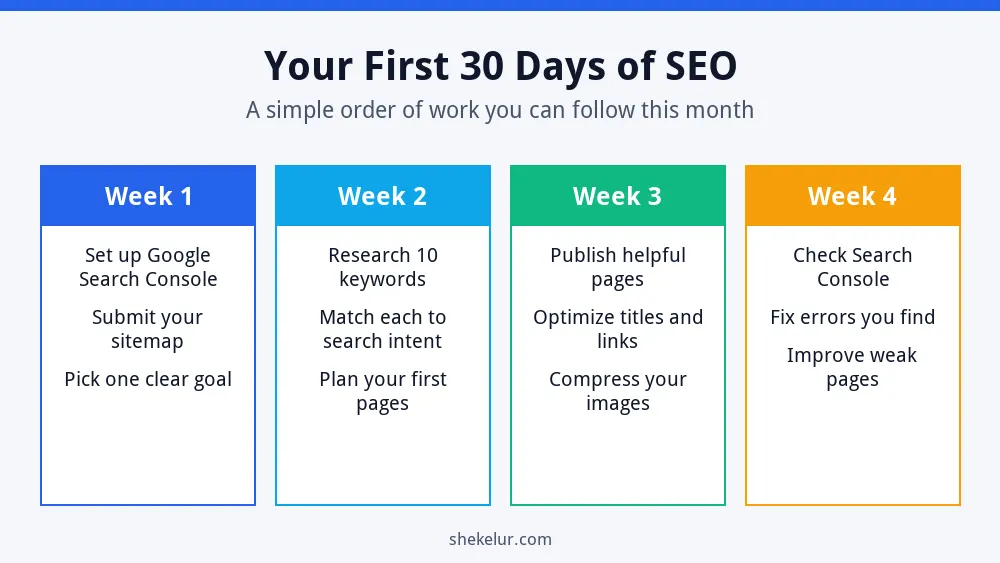
- Week 1: set up Search Console, submit your sitemap and choose one clear goal.
- Week 2: research ten keywords, match each to a search intent and plan your first pages.
- Week 3: publish helpful pages, polish titles and internal links, and compress every image.
- Week 4: review Search Console, fix any errors and improve your weakest page.
Common SEO Mistakes Beginners Make
- Choosing keywords without checking search intent.
- Publishing thin, copied or rushed content.
- Ignoring mobile design and page speed.
- Buying backlinks or following get-ranked-fast promises.
- Skipping tracking, so you never learn what works.
- Expecting results in a few days.
- Forgetting to update older pages.
Final Thoughts on This SEO Guide for Beginners
SEO becomes simple when you take it one step at a time. Set a goal, learn what your audience searches for, write helpful pages, fix the technical basics and earn links honestly. Then measure, learn and repeat. For official advice, the Google SEO Starter Guide is a reliable next read.
Your Next Step: Take Action This Week
Pick one task from the 30-day plan and finish it today. If you would rather save time, you can compare independent freelancers for keyword research, SEO audits, content writing or blog graphics on Fiverr. Read the reviews, check sample work and avoid anyone who guarantees rankings or sells bulk backlinks.
Frequently Asked Questions
What Is the Fastest Way to Improve SEO?
Fix the basics first. Improve your page titles, make sure your pages load quickly on mobile and add internal links to your best content. Then update any page that does not answer the search query clearly.
How Long Does SEO Take to Work?
It depends on your competition and your site’s age. Small improvements can show up within weeks, but many new sites need around three to six months before the trend is clear.
Do I Need Paid SEO Tools?
No. Google Search Console, Bing Webmaster Tools and Google Keyword Planner are free and cover most beginner needs. Paid tools can save time later, but they are optional.
Can I Do SEO Myself or Should I Hire Someone?
You can learn and do the basics yourself, and this guide shows how. However, if you lack time or your site has complex technical issues, hiring a trusted specialist can help.
Are Backlinks Necessary for Beginners?
Links help search engines discover and trust your pages, but you do not need to chase them at the start. Create genuinely useful content first, and avoid paid link schemes that can cause problems.

