You can start email marketing with no experience, no design skills and no budget. All you need is a clear goal, a free email service and a simple way for people to join your list. This guide walks you through each step in plain English.
First, you will set up the basics. Next, you will learn the legal rules that protect you and your subscribers. Finally, you will follow a 30-day plan to send your first campaign with confidence.
Disclosure: this article contains affiliate links, including links to Fiverr and Hostinger. If you buy through them, I may earn a commission at no extra cost to you. Read my affiliate disclosure for details.
Why Email Marketing Still Works
Social platforms change their rules and reach all the time. An email list is different, because you own it. When someone gives you their address, you can reach them directly, without depending on an algorithm.
- Direct access: your message lands in a personal inbox.
- Relationship building: regular, helpful emails build trust over time.
- Flexible goals: you can promote a blog post, a product or a service.
- Low cost: many email services offer free plans for small lists.
How to Start Email Marketing in 4 Steps
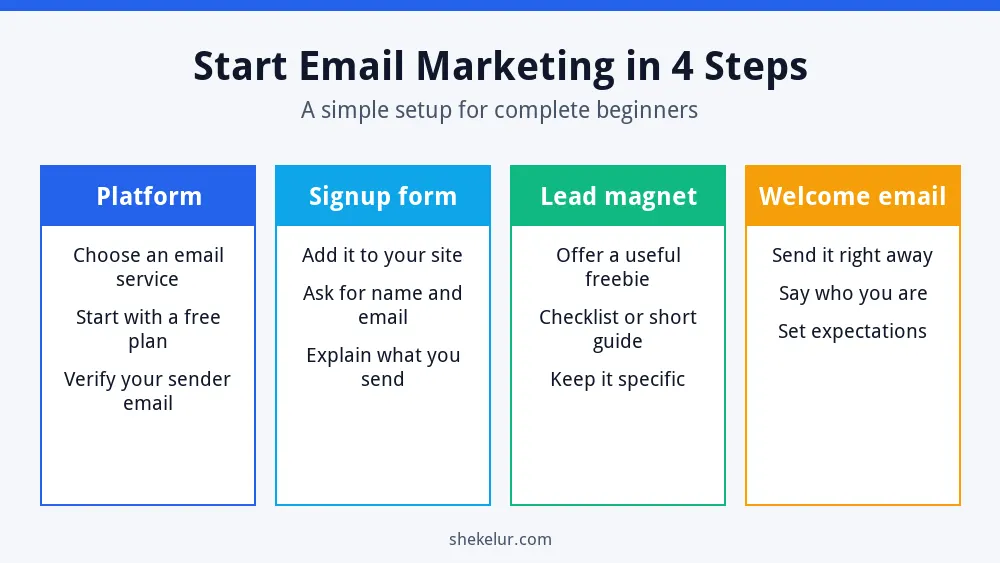
The diagram shows the simple path from nothing to your first subscribers.
Step 1: Set a Simple Goal
Decide what you want email to do for you. For example, you might want 100 subscribers in 90 days, more repeat visitors to your blog or a few customer enquiries each month. A small, specific goal keeps you focused.
Step 2: Choose an Email Marketing Platform
Do not send newsletters from a personal inbox. Personal accounts have sending limits and lack tools such as unsubscribe links and subscriber management. Instead, use a dedicated email service. When you compare options, check these points:
- The free plan: how many subscribers and emails it allows.
- Signup forms that work on your website.
- Basic automation, such as a welcome email.
- Templates that look good on mobile.
- Built-in unsubscribe handling and your required address footer.
- Reputation and support. Read recent reviews before you commit.
For more ideas, see my list of free marketing tools for beginners.
If you already have a WordPress site, Hostinger Reach is a beginner-friendly email marketing tool you can compare. If you want to send from your own domain instead of a free inbox, a professional business email adds credibility. Check each plan’s limits and renewal price first.
Step 3: Build Your List the Right Way
A small list of interested people beats a large list of strangers. Never buy or rent email addresses. It breaks most platform rules, it can violate privacy laws and it hurts your reputation.
Where to Place Your Signup Form
- At the end of every blog post.
- On a dedicated landing page.
- In your site header, footer or sidebar.
- On your About page, where visitors already trust you.
Offer a Lead Magnet
A lead magnet is a free resource that people receive after they subscribe. Keep it specific and quick to use. Good beginner ideas include a one-page checklist, a short guide, a template or a mini email course. If more people visit your site through search, more people will see your form, so also read my SEO guide for beginners.
Step 4: Send a Welcome Email and Your First Campaign
Send the welcome email right after someone joins. People are most interested at that moment. Include these elements:
- A warm thank-you and your name.
- The freebie they signed up for, with a clear link.
- What you will send and how often.
- One question or one link that invites a next step.
Then send your first newsletter within the first two weeks. Use one main topic, short paragraphs and one clear call to action. Preview it on your phone, because many people read email there.
| Email type | Purpose | Example subject line |
|---|---|---|
| Welcome | Deliver the freebie and set expectations | Your checklist is here |
| Helpful tip | Show your expertise | One quick fix for slow pages |
| Update | Share new content | New guide: technical basics |
| Offer | Promote a product or service | A shortcut if you are short on time |
Know the Rules: Consent, CAN-SPAM and Privacy
Following the rules is part of the job. In the United States, the FTC explains the requirements in its CAN-SPAM compliance guide. In short, the law asks you to:
- Use accurate sender and subject information.
- Make clear when a message is an ad.
- Include a valid physical postal address.
- Tell recipients how to opt out, and honor requests promptly.
- Monitor what any company that sends email for you is doing.
If you have subscribers in the European Union or other regions with stricter privacy laws, you also need clear consent. Rules differ by country, so check the requirements for your audience and ask a qualified professional if you are unsure.
Protect Your Deliverability
- Ask your platform how to authenticate your sending domain with SPF, DKIM and DMARC.
- Send only to people who asked to hear from you.
- Make unsubscribing easy, because it is better than a spam complaint.
- Remove subscribers who never engage.
Write Emails People Open and Read
- Subject line: be clear first and clever second. Avoid tricks and all capital letters.
- Preview text: use it to add context to the subject.
- Body: write short paragraphs and use plain language.
- Call to action: give readers one main action.
- Consistency: choose a schedule you can keep, such as every week or every two weeks.
Measure the Right Numbers
Track clicks, click rate, replies, unsubscribes and list growth. Be careful with open rates. Some mail apps, including Apple Mail with its privacy feature, can load emails automatically, so opens may be inflated. Clicks and replies show real interest.
Your First 30 Days of Email Marketing
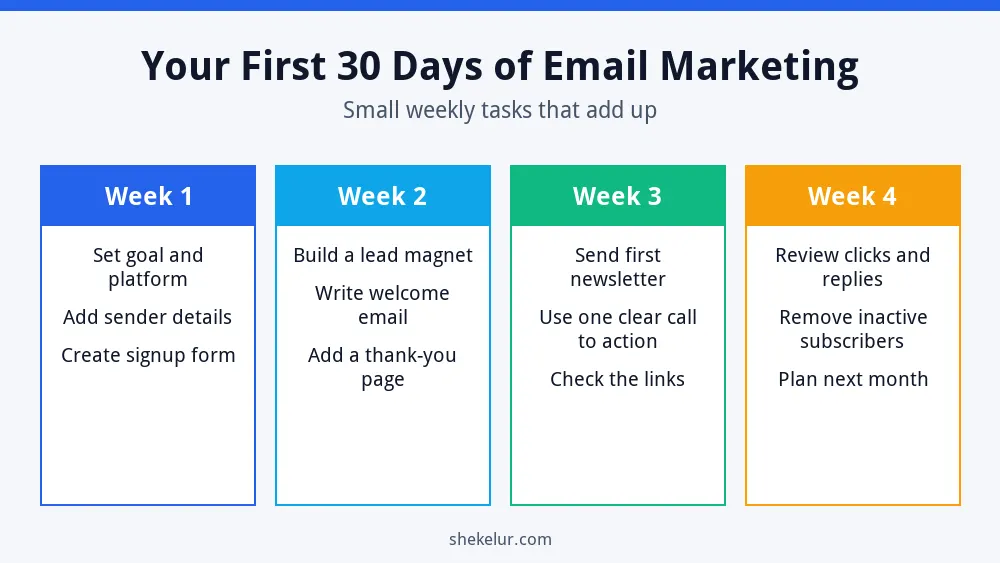
- Week 1: set your goal, choose a platform and add a signup form.
- Week 2: create a lead magnet and write your welcome email.
- Week 3: send your first newsletter with one clear call to action.
- Week 4: review clicks and replies, clean inactive contacts and plan next month.
Common Beginner Mistakes
- Buying an email list.
- Sending from a personal Gmail or Outlook account.
- Promising a freebie and never delivering it.
- Skipping the welcome email.
- Sending too many offers and too little value.
- Ignoring legal requirements.
- Giving up after a few weeks.
Final Thoughts: Start Email Marketing Small
The best way to start email marketing is to keep it simple. Pick a platform, add a form, offer one useful freebie and send a welcome email. Then show up consistently. Over time, your list becomes an asset that you own. To bring more visitors to your form, read my guide on how to build an SEO strategy from scratch.
Try beginner-friendly email marketing
Hostinger Reach lets you build a list, send campaigns and track clicks from one dashboard, with AI help for writing emails. Compare it with other platforms before you commit.
Explore Hostinger ReachAffiliate link. It opens your cart with a plan preselected, so you can change the plan, billing term and add-ons before you pay. Check the renewal price too.
Your Next Step: Set Up Your Signup Form
Choose a platform and create your form this week. If you would rather save time, you can compare independent freelancers for email copywriting, newsletter design or lead magnet graphics on Fiverr. Read the reviews, look at past samples and give clear instructions.
Frequently Asked Questions
Is Email Marketing Free to Start?
Many email services offer a free plan with limits on subscribers or features. Check the current limits, because they change.
How Many Subscribers Do I Need to Begin?
You can start with your first one. A small, engaged list is more useful than a large, inactive one.
How Often Should I Send Emails?
Choose a rhythm you can keep. For most beginners, one email every one or two weeks works well.
Can I Use Gmail to Send a Newsletter?
It is not a good idea. Personal inboxes have sending limits and lack proper unsubscribe and list tools, so use an email marketing platform.
How Do I Keep My Emails Out of Spam?
Send only to people who opted in, authenticate your domain, make unsubscribing easy and write honest subject lines.