Many creators search for free AI voice generators for YouTube because a good voiceover can make a video clearer and easier to produce. However, free does not always mean you can use the audio in a monetized video. Licenses, credit rules and platform policies matter as much as voice quality.
In this guide, you will learn what to check before you publish, how four popular tools compare and how to build a simple voiceover workflow. I checked the vendors’ pages and recent reviews in November 2026, but terms change often, so read the current terms before you publish.
Disclosure: this article contains an affiliate link to Fiverr. If you buy through it, I may earn a commission at no extra cost to you. Read my affiliate disclosure for details.
What to Check Before You Choose a Voice Generator

- License: does the free plan allow commercial use, and is credit required?
- Limits: how many credits or characters do you get, and can you download the file?
- Quality: test a short script for pacing and pronunciation.
- Rules: make sure your use follows YouTube’s policies.
The license is the most important point. If your channel earns money, audio from a plan that bans commercial use can cause trouble later.
Four Popular Tools Compared
ElevenLabs
ElevenLabs is known for natural-sounding voices. Its free plan has been listed at about 10,000 credits per month, which is roughly ten minutes of speech, and it does not include a commercial license. Free output also needs attribution. If you plan to monetize your videos, you would need a paid plan that includes commercial rights.
TTSMaker
TTSMaker is a free online text-to-speech tool. Its own site says you can use the generated audio commercially, including on YouTube, and lists a free allowance of 20,000 characters per week, with some voices available without a limit. The voices are less expressive than premium tools, but it is a practical starting point. You must still follow local laws and check the current terms.
NaturalReader
NaturalReader separates its products. The company says its standard text-to-speech versions are for personal use, while its AI Voice Generator product is the one licensed for commercial and public use. That makes it important to check which product you are using before you publish.
Murf
Murf offers a studio-style editor. Reviews describe its free plan as a trial with a small lifetime allowance and no downloads or commercial rights, so it works best for testing. Paid plans add downloads and commercial use.
| Tool | Free option | Commercial use on free plan | Watch out for |
|---|---|---|---|
| ElevenLabs | About 10,000 credits a month | No; attribution required | Needs a paid plan for monetized videos |
| TTSMaker | Free weekly character limit | Stated as allowed; check current terms | Weekly limits and captchas; less expressive voices |
| NaturalReader | Plan-dependent | Only with its commercial product | Make sure you use the licensed product |
| Murf | Small trial allowance | No | Free plan is mainly for testing |
YouTube Rules to Know
Using an AI voice is allowed on YouTube, but two policies matter. First, YouTube asks creators to disclose realistic altered or synthetic content, for example a voice that could be mistaken for a real person or a cloned voice of someone else. Second, its monetization rules target inauthentic content, which includes mass-produced or repetitive videos. A channel that publishes the same template again and again with little original value can lose monetization, whether or not it uses AI.
- Add real value with original scripts, research and editing.
- Disclose realistic synthetic voices when YouTube’s settings require it.
- Never clone or imitate a real person’s voice without permission.
- Review YouTube’s current policies in its Help Center before you publish.
A Simple AI Voiceover Workflow
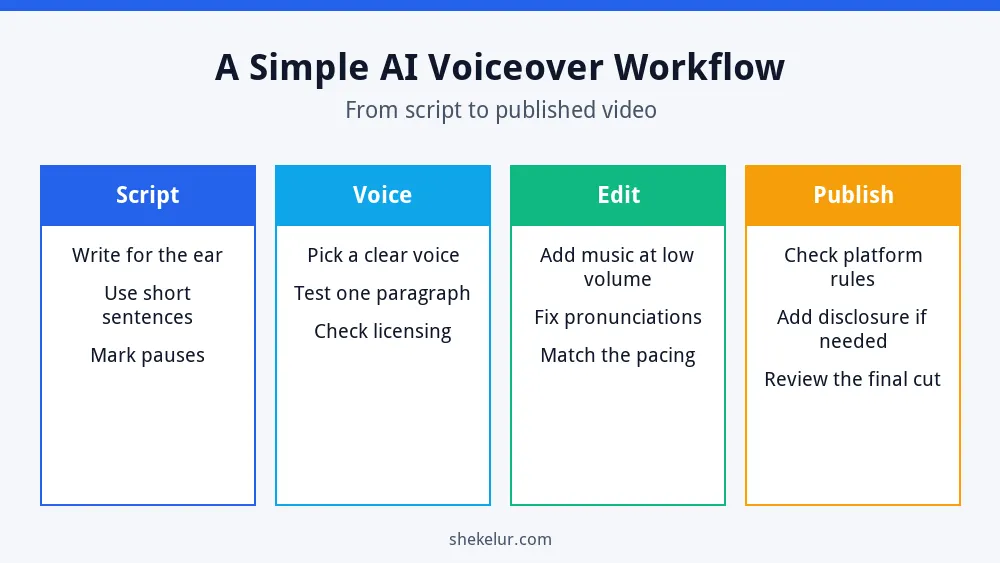
- Script: write for the ear, with short sentences. If you use AI to help, read my ChatGPT guide for beginners and then edit the draft yourself.
- Voice: test one paragraph and confirm the license.
- Edit: fix pronunciations, match the pacing and keep music quiet.
- Publish: check platform rules and add disclosure when needed.
If you publish AI-assisted content on a website too, my article on whether AI writing tools can rank on Google explains how to keep quality high.
When a Human Voice Is the Better Choice
AI voices are fast and cheap, but a human voice can add warmth, emotion and trust. Consider a human narrator for brand videos, ads, courses and any project where personality matters. You can compare independent voice actors on Fiverr, listen to samples and confirm the usage rights before you order.
Common Mistakes
- Using free-plan audio in a monetized video without checking the license.
- Forgetting required attribution.
- Publishing the same robotic voice and template on every video.
- Cloning a real person’s voice without permission.
- Skipping a test of pronunciation and pacing.
Final Thoughts on Free AI Voice Generators for YouTube
The best free AI voice generators for YouTube are the ones whose license matches your plans. Test a short script, read the terms, follow YouTube’s rules and add real value to every video. When the stakes are higher, a paid plan or a human voice may be worth it.
Your Next Step: Test One Script
Pick one short script and generate it in two tools, then compare the sound and the license. If you want a polished voiceover without the guesswork, you can browse voice actors and audio editors on Fiverr using the button below.
Frequently Asked Questions
Can I Use Free AI Voices in Monetized YouTube Videos?
Only if the tool’s license allows commercial use. Some free plans do not, so read the current terms for each tool.
Does YouTube Ban AI Voices?
No, but it asks you to disclose realistic synthetic content, and it can limit monetization for mass-produced or repetitive videos.
Do I Need to Credit the Tool?
Some free plans require attribution, so check the terms. A paid plan may remove that requirement.
Which Free Voice Generator Sounds Most Natural?
Voice quality is subjective. Premium-style tools often sound more natural, but test the same script in several tools and choose the one that fits your audience.
Can I Clone My Own Voice?
Many tools offer voice cloning on paid plans. Use only your own voice or a voice you have clear permission to use, and follow YouTube’s disclosure guidance.
