If you want your pages to show up in Google, you need to know the technical SEO basics. Technical SEO is not about writing better articles. It is about the foundation of your site: the behind-the-scenes settings that help search engines find, read and trust your pages.
This guide keeps things simple. You will learn the key areas, how to run a free audit and which mistakes to avoid. You do not need to code to follow along.
Disclosure: this article contains affiliate links, including links to Fiverr and Hostinger. If you buy through them, I may earn a commission at no extra cost to you. Read my affiliate disclosure for details.
What Are Technical SEO Basics?
Technical SEO means making sure search engines can crawl, index and render your website, and that visitors have a fast, safe experience. Think of a shop. Great products matter, but customers still need an open door, clear signs and a safe building.
Why Technical SEO Matters
- Visibility: a page that search engines cannot reach or index cannot appear in results.
- User experience: slow, broken or insecure pages make visitors leave.
- Efficiency: fixing one site-wide issue can help hundreds of pages at once.
- Protection: small mistakes, such as a leftover noindex tag, can quietly remove pages from search.
The Four Areas of Technical SEO
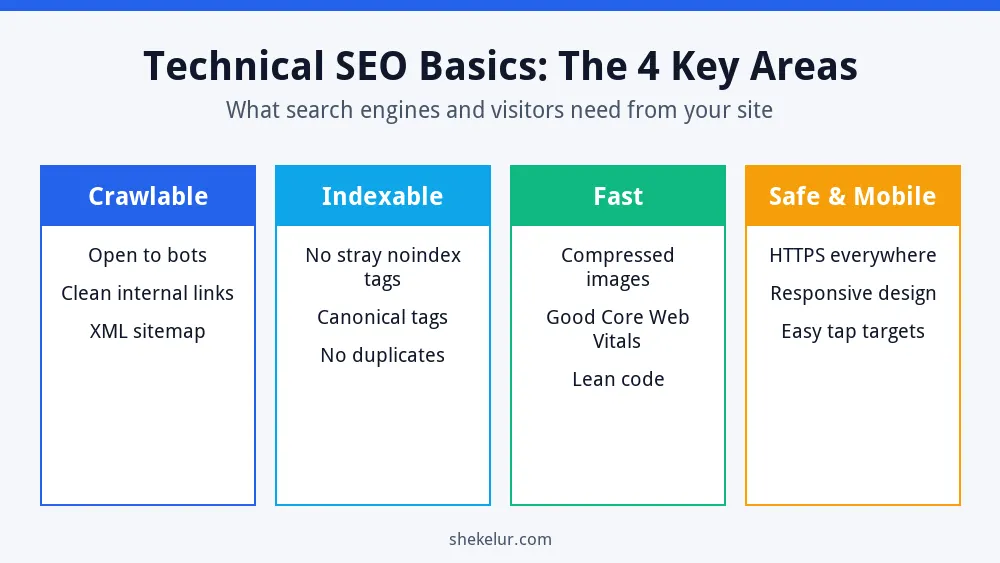
Almost every technical task fits into one of four areas. Use this diagram as a mental map.
Make Your Site Crawlable
Crawlable means search engine bots can reach your pages. Three things matter most:
- Internal links: every important page should be linked from another page. A page with no links is called an orphan page and is easy to miss.
- XML sitemap: a file that lists the URLs you want crawled. Google explains how in its sitemap overview.
- Robots.txt: a small file that tells crawlers which areas to skip. Read the robots.txt introduction before editing, because one wrong line can block your whole site.
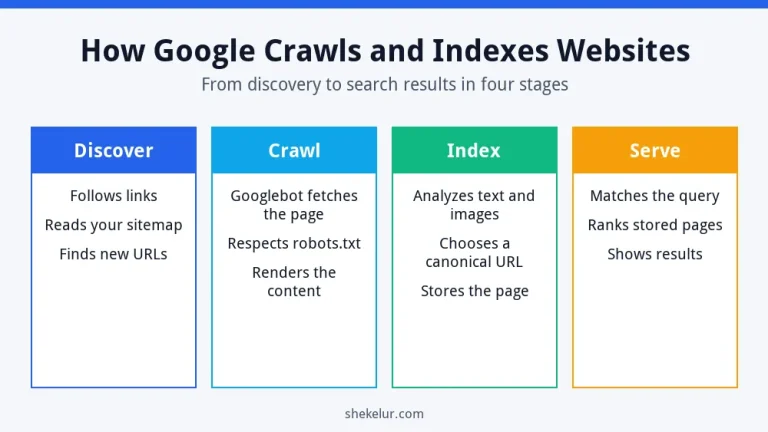
To see the full process, read my guide on how Google crawls and indexes websites.
Make Your Site Indexable
Indexable means a page is allowed to be stored and shown in search. Check these points:
- Remove noindex tags from pages that should rank. Google describes the tag in its guide to blocking indexing.
- Use canonical tags to point duplicate or similar URLs to one preferred version.
- In WordPress, open Settings, then Reading, and make sure “Discourage search engines from indexing this site” is not ticked.
Many people forget the last point after building a site in private. As a result, a live site can stay invisible for weeks.
Improve Speed and Core Web Vitals
Fast pages keep visitors happy. Google measures real-user experience with Core Web Vitals. The targets below come from web.dev.
| Metric | What it measures | Good target |
|---|---|---|
| LCP | How fast the main content loads | 2.5 seconds or less |
| INP | How quickly the page responds to taps and clicks | 200 milliseconds or less |
| CLS | How much the layout shifts while loading | 0.1 or less |
Test your key pages with PageSpeed Insights. Then apply the quick wins:
- Compress images and use modern formats such as WebP.
- Set image width and height to reduce layout shifts.
- Use a caching plugin and reliable WordPress hosting.
- Remove plugins and scripts that you do not need.
Fix speed at the source
If your pages stay slow after you compress images, your hosting may be the bottleneck. Hostinger’s hosting plans run on LiteSpeed server technology and supports the LiteSpeed Cache plugin for WordPress, which can help with page caching. Compare the plan features before you decide.
See Hostinger web hosting plansAffiliate link. It opens your cart with a plan preselected, so you can change the plan, billing term and add-ons before you pay. Check the renewal price too.
Mobile Friendliness and HTTPS
Google mainly uses the mobile version of your pages for indexing, so your mobile design must contain the same key content as desktop. Use a responsive theme and test pages on a real phone. Also use HTTPS everywhere. It protects visitors’ data and shows that your site is trustworthy. Most hosts offer free SSL certificates.
Site Structure and URLs
- Group related pages into clear categories.
- Keep important pages within a few clicks of the homepage.
- Use short, readable URLs, such as /technical-seo-basics/.
- Add breadcrumbs so visitors and bots understand where a page sits.
For the content side of the same job, see my guide to on-page SEO for new websites.
Structured Data
Structured data is code that labels the content of a page, such as an article, a product or an event. It helps search engines understand your page, and in some cases it makes you eligible for rich results. Start with Google’s structured data introduction, and test your pages with the Rich Results Test. Plugins like Yoast SEO add basic schema automatically.
Fix Broken Links and Redirects
- 404 errors: restore the page or redirect it to the closest match.
- 301 redirects: use them when a page moves permanently.
- Redirect chains: avoid sending visitors through several redirects in a row.
- Internal links: update links so they point to the final URL.
How to Run a Simple Technical SEO Audit
You can find most beginner issues with free tools in about an hour.
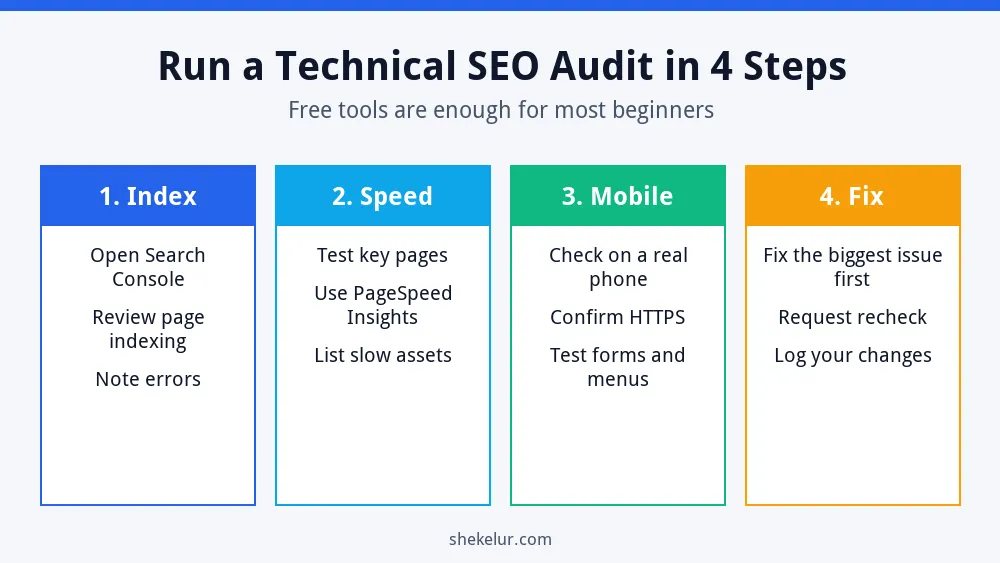
- Open Google Search Console and review the Page indexing report for errors.
- Test your homepage and two top pages in PageSpeed Insights. You can also use Lighthouse in Chrome.
- Check your site on a real phone and confirm that it loads over HTTPS.
- Fix the biggest issue first, then ask Search Console to recheck.
Common Technical SEO Mistakes
- Leaving noindex or the WordPress discourage setting on after launch.
- Blocking important folders in robots.txt.
- Uploading huge, uncompressed images.
- Letting duplicate URLs compete with each other.
- Ignoring 404 errors for months.
- Changing URLs without redirects.
- Never checking Search Console.
Quick Technical SEO Checklist
- Site is on HTTPS.
- Sitemap is submitted in Search Console.
- Robots.txt does not block key pages.
- Important pages are indexable.
- Pages pass Core Web Vitals or are improving.
- Mobile layout works.
- No broken internal links.
- Structured data passes the Rich Results Test.
Final Thoughts on Technical SEO Basics
Technical SEO basics are about removing obstacles. Fix crawling, indexing, speed and security first. Then put your energy into helpful content and links. For the full roadmap, read my SEO guide for beginners and how to build an SEO strategy from scratch.
Your Next Step: Run Your First Audit
Pick one tool from this guide and check your site today. If the results feel confusing, or you would rather hand the work to someone else, you can compare independent technical SEO freelancers on Fiverr. Check reviews and sample audits first, and avoid sellers who promise guaranteed rankings.
Frequently Asked Questions
What Is Technical SEO in Simple Words?
It is the work that helps search engines access, understand and index your site, and that gives visitors a fast, secure experience.
Do I Need to Code to Do Technical SEO?
No. Most beginner tasks use free tools and plugins. You only need to follow a checklist and fix one issue at a time.
How Often Should I Run a Technical SEO Audit?
Check Search Console monthly and run a fuller audit every three to six months, or after a redesign, migration or big plugin change.
Is Technical SEO More Important Than Content?
Neither works alone. Technical SEO lets search engines reach your content, and great content gives them a reason to rank it.
What Is the First Technical SEO Fix I Should Make?
Confirm that your important pages are indexable and that your sitemap is submitted. After that, improve speed and mobile usability.