Starting a business or growing a personal brand can feel overwhelming, especially when you see the costs of marketing tools. But here’s some good news: many powerful marketing tools are free, and you can use them to get real results. If you’re a beginner and want to stretch your budget, free tools can help you build your online presence, reach more people, and learn what works without spending money.
This guide will show you the most useful free marketing tools for beginners. You’ll see how each tool works, what makes it special, and how to use it for your own marketing. We’ll go beyond the basics and highlight insights that many beginners miss—so you get practical, step-by-step help.
Plus, you’ll find comparison tables and answers to common questions at the end.
Why Free Marketing Tools Matter
Getting started in marketing is tough if you don’t have the right resources. Paid tools often promise great features but can cost hundreds of dollars each month. For beginners, this isn’t practical. Free tools allow you to:
- Test different marketing strategies
- Learn which channels work best for your audience
- Save money for other important needs
- Build confidence before investing in paid tools
One insight many beginners miss: free tools aren’t just for beginners. Even experienced marketers use them to supplement paid platforms or for quick, small tasks.
Free Tools For Social Media Marketing
Social media is a must for modern marketing. But it’s easy to waste time if you don’t use the right tools. Let’s look at some of the most popular free tools for social media.
Canva
Canva is a graphic design tool that makes creating social media posts easy. You don’t need any design skills to use it. Just drag and drop elements, choose templates, and download your designs.
- Free version includes thousands of templates
- Simple interface for beginners
- Export graphics in different formats
Most beginners don’t realize Canva also offers free video editing and animated posts.
Buffer
Buffer lets you schedule posts for Facebook, Twitter, Instagram, LinkedIn, and Pinterest. With Buffer’s free plan, you can schedule up to 10 posts per platform.
- Manage multiple accounts from one dashboard
- Basic analytics to see which posts work best
- Browser extension for quick sharing
A common mistake: not checking analytics regularly. Buffer’s free analytics show which posts get the most engagement—use this data to improve your strategy.
Hootsuite
Hootsuite is another popular scheduling tool. Its free plan allows you to manage two social media accounts and schedule up to five posts at a time.
- Monitor mentions and interactions
- Create streams to follow hashtags and topics
- Easy-to-use calendar for planning
Many beginners skip setting up streams. Streams let you track conversations and trends, which helps you join relevant discussions.
Comparison: Social Media Scheduling Tools
Here’s a quick comparison of three leading free tools:
| Tool | Free Post Limit | Accounts Supported | Extra Features |
|---|---|---|---|
| Buffer | 10 per platform | 3 | Basic analytics |
| Hootsuite | 5 per account | 2 | Streams |
| Canva | Unlimited (designs only) | N/A | Templates, video editing |
Free Tools For Email Marketing
Email marketing is one of the most effective ways to connect with your audience. Fortunately, you don’t need to pay to get started.
Mailchimp
Mailchimp is a well-known email marketing platform. Its free plan lets you send emails to up to 500 contacts and includes basic automation.
- Drag-and-drop email builder
- Simple signup forms
- Basic reporting
Most beginners overlook Mailchimp’s free landing pages, which can help you collect emails without building a website.
Mailerlite
MailerLite offers a free plan for up to 1,000 subscribers and 12,000 emails per month. Its interface is easy for beginners.
- Email automation workflows
- Drag-and-drop editor
- Free landing pages
A practical tip: Use MailerLite’s automation to send welcome emails. This helps new subscribers feel valued and improves engagement.
Benchmark Email
Benchmark Email gives you up to 500 contacts and 3,500 emails per month on its free plan.
- Simple email templates
- Basic automation
- Reporting tools
An insight many beginners miss: Benchmark Email has a free image library, so you don’t have to search for pictures elsewhere.
Comparison: Free Email Marketing Tools
Here’s how these platforms stack up:
| Tool | Contact Limit | Email Limit | Automation | Landing Pages |
|---|---|---|---|---|
| Mailchimp | 500 | 1,000/month | Basic | Yes |
| MailerLite | 1,000 | 12,000/month | Advanced | Yes |
| Benchmark | 500 | 3,500/month | Basic | No |
Free Tools For Search Engine Optimization (seo)
SEO helps your website appear in Google searches. You don’t need to buy expensive tools to start optimizing your site.
Google Search Console
Google Search Console is a free tool from Google. It shows how your website performs in search results.
- Track keywords that bring visitors
- See indexing issues
- Submit sitemaps
A useful tip: Check which pages are getting impressions but not clicks. Improve titles and meta descriptions to boost click-through rates.
Ubersuggest
Ubersuggest offers keyword research, site audits, and backlink data. Its free plan allows three searches per day.
- Find keyword ideas
- See your site’s SEO health
- Analyze backlinks
Many beginners don’t use the site audit feature. Audits show technical problems—fixing them can quickly improve rankings.
Mozbar
MozBar is a browser extension that shows SEO data as you browse websites.
- View page authority and domain authority
- Highlight keywords on pages
- Export data for analysis
An insight: Use MozBar to check competitors’ strengths and weaknesses. This helps you spot opportunities.
Comparison: Free Seo Tools
| Tool | Keyword Research | Site Audit | Backlink Data | Extra Features |
|---|---|---|---|---|
| Google Search Console | Limited | Indexing only | No | Performance tracking |
| Ubersuggest | Yes | Yes | Yes | SEO analysis |
| MozBar | Limited | No | Yes | On-page metrics |

Free Tools For Content Marketing
Content is the backbone of online marketing. Good content attracts visitors, builds trust, and drives sales. You can create, edit, and organize content using free tools.
Grammarly
Grammarly is a writing assistant that checks grammar, spelling, and clarity. Its free version covers basic corrections.
- Checks emails, blog posts, and social media
- Easy browser extension
- Suggestions for better writing
A tip: Use Grammarly’s tone detector to make sure your content feels friendly or professional—whichever fits your brand.
Google Docs
Google Docs is an online word processor. You can write, edit, and collaborate with others for free.
- Real-time collaboration
- Autosave and version history
- Commenting and suggestions
Beginners often forget to use the “Explore” feature. It helps find quotes, images, and research without leaving your document.
Hemingway Editor
Hemingway Editor highlights hard-to-read sentences and suggests ways to simplify your writing.
- Free online editor
- Color-coded feedback
- Grade-level readability scores
An insight: Aim for grade 6–8 readability. This makes your content easy for most readers—including non-native speakers.
Free Tools For Visual Content Creation
Images and videos help your marketing stand out. You don’t need expensive software to create visuals.
Unsplash
Unsplash provides free, high-quality photos. You can use them for websites, social media, or ads.
- Search thousands of images
- No copyright worries
- Download without registration
A practical tip: Use keywords related to your brand. Unsplash’s search is powerful, but specific terms find better photos.
Giphy
GIPHY is the largest library of free GIFs. Add GIFs to emails, social media, or blog posts for extra engagement.
- Easy search and download
- Create your own GIFs
- Share directly to platforms
Beginners often forget that GIFs can make content feel fun and memorable. Try adding them to your posts.
Pixlr
Pixlr is a free photo editing tool. You can crop, resize, and add effects to images online.
- No download needed
- Supports layers and filters
- Works on mobile
A tip: Use Pixlr’s batch editing to save time when you need to process many images.
Free Tools For Website And Landing Page Creation
Building a website doesn’t need to cost money. Free tools help you create pages that look professional.
WordPress.com
WordPress.com offers free websites with hundreds of themes. You can start a blog or business site in minutes.
- Drag-and-drop editor
- Free hosting and SSL
- Responsive design for mobile
An insight: WordPress.com sites are easy to upgrade to paid plans later. So you can start free, then add features as you grow.
Wix
Wix is a website builder with a free plan. It includes templates for portfolios, stores, and more.
- Visual drag-and-drop editor
- Built-in SEO tools
- Free hosting
Beginners often miss Wix’s free logo maker. This is a quick way to get a basic brand logo.
Google Sites
Google Sites lets you build simple websites for free. It’s ideal for portfolios, event pages, or internal business pages.
- Simple templates
- No coding required
- Integrates with Google Drive
A tip: Use Google Sites for quick landing pages when running campaigns.
Free Tools For Analytics And Tracking
Tracking your marketing results is key. Free analytics tools help you understand what works and what doesn’t.
Google Analytics
Google Analytics is the most popular free analytics tool. It tracks website visits, user behavior, and conversions.
- See which pages get traffic
- Track sources of visitors
- Measure goals and events
A non-obvious insight: Set up goals in Google Analytics, not just basic tracking. This helps you measure real business outcomes.
Bitly
Bitly lets you shorten links and track clicks. The free plan gives you basic analytics.
- Custom short URLs
- See click data
- Track performance across campaigns
Beginners often forget to use custom links for each campaign. This lets you see which sources bring the most traffic.
Hotjar
Hotjar offers heatmaps and visitor recordings. Its free plan covers up to 35 sessions per day.
- Visualize where users click
- Watch real user recordings
- Collect feedback polls
A tip: Use Hotjar’s polls to ask visitors why they leave your site. This data is more useful than guessing.
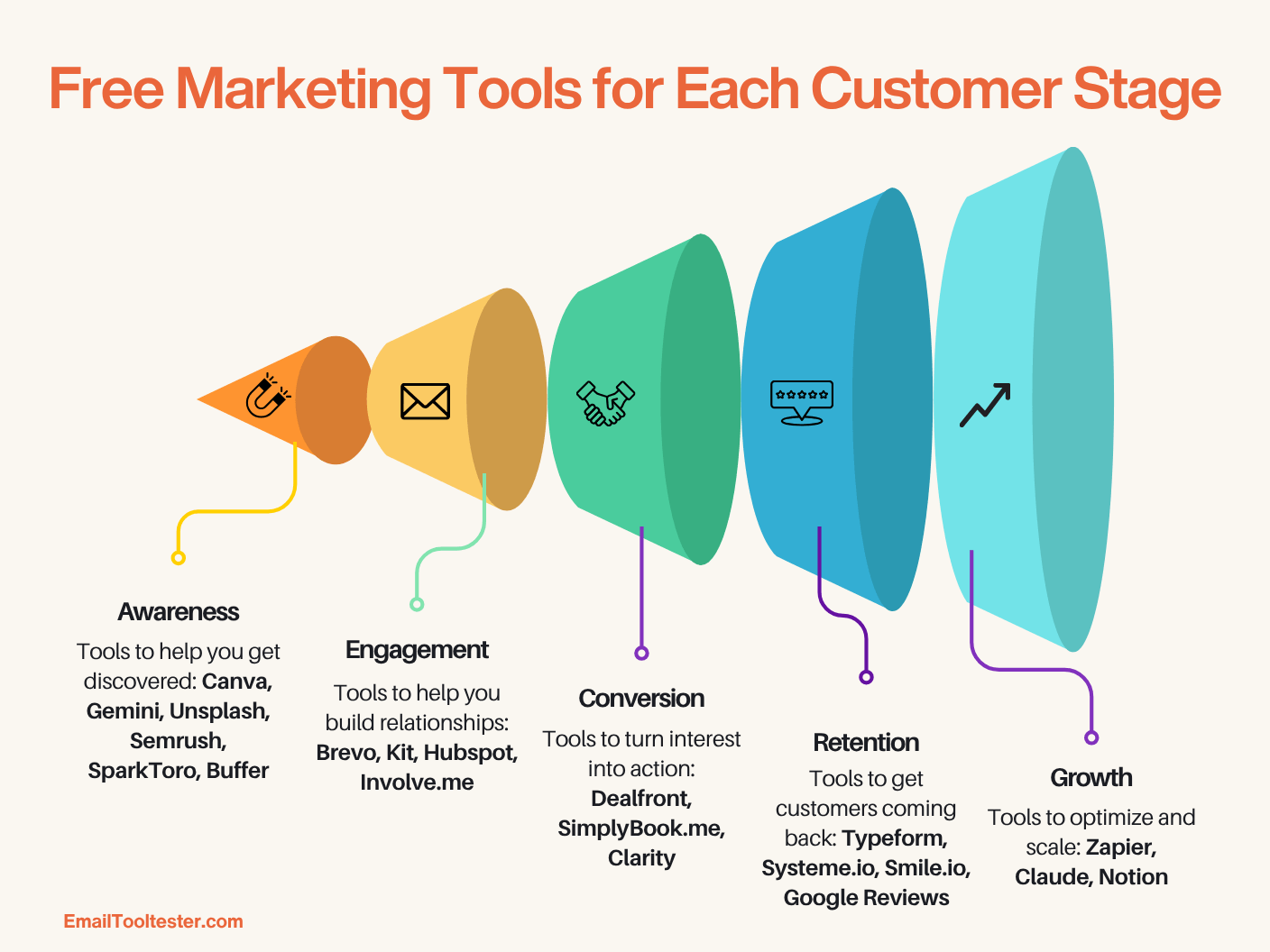
Free Tools For Customer Relationship Management (crm)
Managing contacts and leads is easier with CRM tools. You can track conversations and follow-ups without paying.
Hubspot Crm
HubSpot CRM is a free platform that helps you manage contacts, deals, and tasks.
- Unlimited users and contacts
- Track emails and calls
- Dashboard for pipeline management
A practical tip: Use HubSpot’s email tracking to see when contacts open your messages. This helps you follow up at the right time.
Zoho Crm
Zoho CRM offers a free plan for up to three users. It covers basic contact and lead management.
- Simple contact organization
- Basic automation
- Task reminders
Beginners often miss Zoho’s mobile app. It makes tracking leads easy when you’re away from your computer.
Insightly
Insightly gives you basic CRM features for up to two users on the free plan.
- Manage contacts and tasks
- Track project progress
- Email integration
An insight: Insightly’s project tracking helps you organize marketing campaigns as projects.
Free Tools For Project And Task Management
Marketing involves many tasks—planning content, scheduling campaigns, and tracking deadlines. Free tools keep you organized.
Trello
Trello uses boards and cards for visual task management. It’s easy to use and flexible.
- Drag-and-drop interface
- Unlimited boards on free plan
- Mobile app for on-the-go access
A tip: Use Trello’s checklists to break big tasks into smaller steps.
Asana
Asana offers a free plan for up to 15 users. It’s good for teams and solo marketers.
- Task lists and timelines
- Assign tasks to team members
- Calendar view
Beginners often forget to use Asana’s calendar for planning campaigns. Visual timelines help prevent missed deadlines.
Google Keep
Google Keep is a simple note-taking tool. It’s perfect for reminders, ideas, and quick lists.
- Syncs across devices
- Easy sharing
- Color-coded notes
A practical insight: Use Google Keep for quick marketing ideas, then move them to Trello or Asana for planning.
Real Data: How Free Tools Impact Beginners
Many small businesses and startups rely on free tools. According to a 2023 survey by Statista, 47% of small businesses use only free tools for marketing in their first year. The most popular categories are social media, email, and analytics.
Free tools also help you learn faster. When you don’t risk money, you can experiment more, test new strategies, and discover what works best for your audience. Most paid tools have a learning curve—starting with free versions lets you build skills first.
Common Mistakes Beginners Make With Free Tools
- Ignoring analytics: Many beginners use free tools but don’t check the data. Always review performance and adjust.
- Using too many tools: It’s easy to sign up for everything and get overwhelmed. Start with 2–3 tools per category.
- Not updating content: Tools help you create content, but you must keep it fresh.
- Missing integrations: Some free tools connect to each other—using these integrations saves time.
- Skipping tutorials: Most tools have free guides or help centers. Take time to learn features.
Practical Tips For Choosing Free Marketing Tools
- Focus on your needs: Choose tools that solve your biggest challenges first. For example, if you need more followers, start with social media tools.
- Check for scalability: Make sure the tool has paid upgrades if you want to grow later.
- Look for integrations: Tools that connect to each other (like Mailchimp and WordPress) save time.
- Read reviews: See what other beginners say about each tool.
- Try before committing: Test tools for a week or two. See if they fit your workflow.
Frequently Asked Questions
What Are The Best Free Marketing Tools For Absolute Beginners?
The best tools depend on your goals, but most beginners find Canva, Mailchimp, and Google Analytics useful. These tools cover design, email, and analytics—all key areas.
Can I Use Free Tools For Business, Or Are They Just For Personal Use?
Most free tools are designed for both personal and business use. Some have limits, like fewer contacts or posts, but you can run real campaigns and build your brand.
How Do I Know When To Switch From Free To Paid Tools?
Switch when you need features that the free plan doesn’t offer. For example, if your email list grows above the free limit or you want advanced analytics, consider upgrading.
Are Free Marketing Tools Safe And Reliable?
Most free tools from well-known companies are safe and reliable. Always check reviews and privacy policies. Avoid tools that ask for unnecessary information or have poor ratings.
Where Can I Learn To Use These Tools Effectively?
Most tools have their own tutorials or help centers. For extra learning, use trusted sites like HubSpot Academy, which offers free courses on marketing tools.
Free marketing tools can help you grow your business or brand, even if you’re just starting. By choosing the right tools, learning their features, and focusing on your goals, you can build a strong foundation for future success—without spending money.
Remember, the secret is not just using tools, but using them wisely. Try, test, and improve as you go. The world of marketing is open to anyone willing to learn.
