The right AI voice tools for podcast production can clean up a noisy recording, speed up editing and even create a short intro. However, listeners and platforms care about honesty, so you need to know when AI is helping and when it must be disclosed. This guide covers the main tools, their free limits and a disclosure checklist.
Plans change often, so I checked vendor pages and recent reviews in November 2026. Confirm the current limits and terms before you rely on any tool.
Disclosure: this article contains affiliate links, including links to Fiverr, Hostinger and ElevenLabs. If you buy through them, I may earn a commission at no extra cost to you. Read my affiliate disclosure for details.
Where AI Fits in Podcast Production
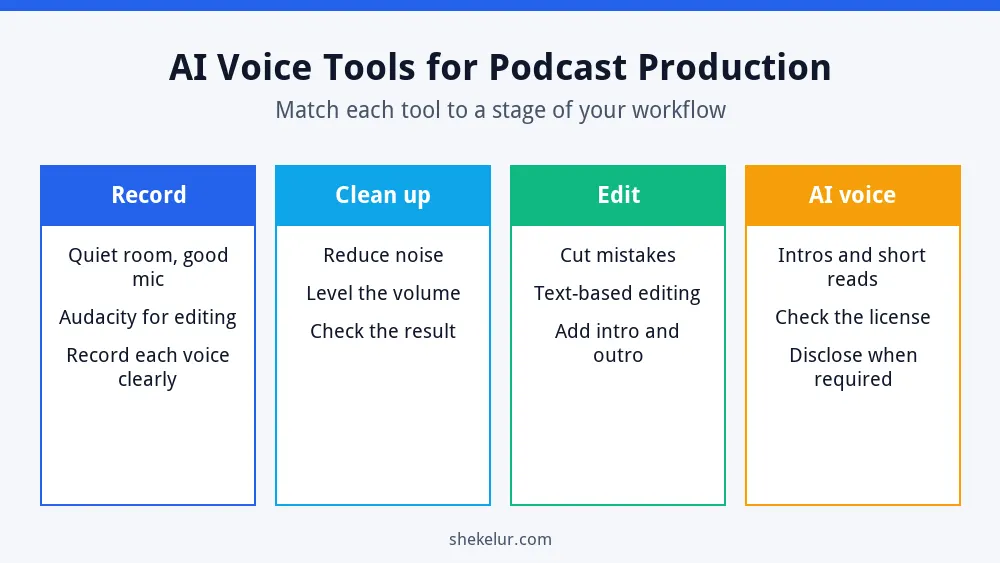
Most podcasters use AI in two different ways. First, AI can improve your own recording by reducing noise, leveling volume and removing filler words. Second, AI can generate a voice for parts of an episode, such as an intro or a translated segment. The first use is usually low risk. The second needs careful license and disclosure checks.
Audio Cleanup and Editing Tools
Adobe Podcast Enhance Speech
Adobe Podcast Enhance Speech is a quick way to rescue a noisy voice recording. The free tier has been reported as audio-only, with limits on file length and daily processing, while Premium adds video support and higher limits. Because files are processed on Adobe’s servers, avoid uploading confidential recordings.
Auphonic
Auphonic focuses on leveling and loudness for finished episodes. It has offered a free monthly allowance, but free productions have included an Auphonic jingle, so treat the free plan as a trial for publish-ready work.
Audacity
Audacity is a free, open-source audio editor with noise reduction and multitrack editing. It has no AI voice features, but it gives you full manual control at no cost.
Descript
Descript lets you edit audio by editing a transcript. Its free plan has limited media hours and watermarked video exports, so serious podcasters usually need a paid plan.
AI Voice Generators for Intros and Short Reads
ElevenLabs is a popular AI voice tool. Its free plan has no commercial license, and free output requires attribution, so a monetized show needs a paid plan with commercial rights. If you are comparing options, read my guide to free AI voice generators for YouTube, which explains license differences in detail.
Need an intro, outro or short narration?
You can sign up for ElevenLabs and test a short script on the free plan. Free-plan audio has no commercial license, so a monetized podcast needs a paid plan that includes commercial rights. Check the current terms before you publish.
Try ElevenLabsAffiliate link. I may earn a commission at no extra cost to you.
| Job | Tool type | Watch out for |
|---|---|---|
| Fix a noisy recording | Adobe Podcast Enhance Speech | Free limits; cloud upload privacy |
| Level and finish episodes | Auphonic | Free output may include a jingle |
| Manual editing | Audacity | Learning curve; no AI features |
| Transcript-based editing | Descript | Free plan limits and watermarked video |
| AI intro or short narration | AI voice generators | Commercial license and disclosure rules |
AI Disclosure Rules for Podcasters
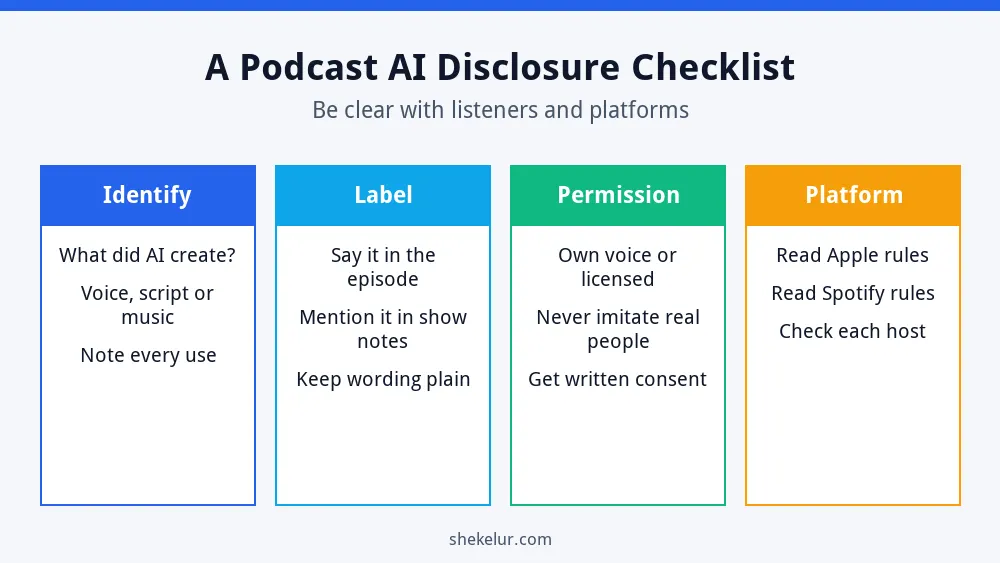
Platform rules are changing. Apple Podcasts’ content guidelines, published at Apple Podcasts for Creators, have been described as requiring prominent disclosure of AI-generated audio in the content and metadata. Spotify has been reported to prohibit unauthorized voice cloning and impersonation. Read each platform’s current rules before you publish.
- Identify: note exactly what AI created, such as a voice, a script or music.
- Label: say it in the episode and in the show notes, in plain words.
- Permission: use only your own voice or a licensed voice, and never imitate a real person without consent.
- Platform: check the rules of your podcast host and each directory.
Simple cleanup such as noise removal and leveling is generally treated differently from AI that creates the voice itself, but when in doubt, be transparent. If you also publish clips to YouTube, my guide to AI video generators for faceless YouTube channels explains the video side.
Do You Need a Website for Your Podcast?
Your audio files should live on a podcast host, not on regular web hosting. Still, a website gives each episode a page for show notes, transcripts and sign-ups, which also helps people find you in search. If you build one on WordPress, you will need web hosting for your podcast website. Compare plan features, the billing term and the renewal price before you buy. For the search side, read my SEO guide for beginners.
A Simple Podcast Workflow
- Record in a quiet room with a decent microphone.
- Clean the audio, then level the volume.
- Edit out mistakes and add your intro and outro.
- Add AI voice only where it helps, and check the license.
- Write show notes and disclose any AI use.
- Publish through your podcast host and share clips.
Common Mistakes
- Using free-plan AI voices in a monetized show.
- Uploading confidential recordings to cloud tools.
- Skipping disclosure when AI creates the voice.
- Imitating a real person’s voice.
- Over-processing audio until it sounds unnatural.
Final Thoughts on AI Voice Tools for Podcast Production
The best AI voice tools for podcast production make your show sound clearer and save time, but your ideas and your honesty keep listeners. Clean your audio, use AI voices carefully, follow platform rules and tell your audience when AI plays a real part.
Your Next Step: Improve One Episode
Pick one recording and clean it with a free tool. If you want help with editing, intro music or cover art, you can compare independent freelancers on Fiverr. Read the reviews, listen to samples and confirm the usage rights before you order.
Frequently Asked Questions
Can I Use AI Voices in a Podcast?
Yes, if the tool’s license allows it and you follow platform disclosure rules. Never imitate a real person without permission.
Do I Have to Disclose AI in My Podcast?
Platforms such as Apple Podcasts have rules about AI-generated audio, so check the current guidelines and be transparent with listeners.
What Is the Best Free Tool to Clean Podcast Audio?
Adobe Podcast Enhance Speech and Audacity are popular free starting points, but each has limits, so test them on a short clip.
Can I Monetize a Podcast That Uses AI Voices?
It depends on the voice tool’s license and the platform rules. Use a plan that includes commercial rights.
Do I Need Web Hosting for a Podcast?
You need a podcast host for audio files. A website is optional, but it helps with show notes and search visibility.