Using ChatGPT for freelancers can save hours every week, but only if you use it with care. It can help you outline, draft, edit and organize your work. It cannot replace your skills, your judgment or your responsibility to your clients. This guide shows practical ways to use it, how to write better prompts and how to stay safe.
Disclosure: this article contains affiliate links, including links to Fiverr and Hostinger. If you buy through them, I may earn a commission at no extra cost to you. Read my affiliate disclosure for details.
What Is ChatGPT and Why Should Freelancers Care?
ChatGPT is an AI assistant that responds to written instructions, called prompts. It can summarize, brainstorm, rewrite and explain. Freelancers care because their time is their income. Less time on routine tasks means more time for paid work, better quality or a healthier schedule.
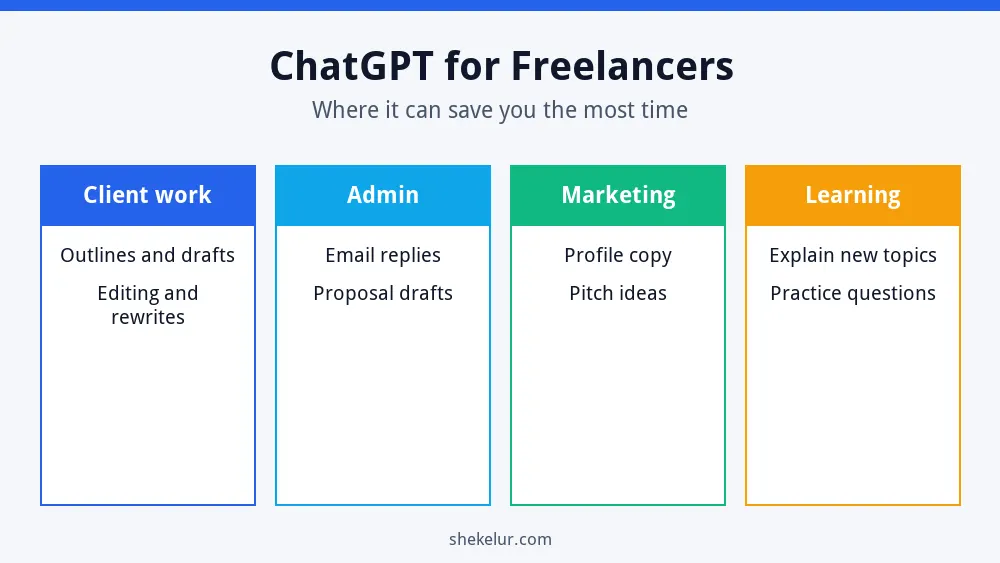
ChatGPT for Freelancers: Where It Saves the Most Time
10 Practical Ways to Use ChatGPT in Freelance Work
- Research summaries: ask for a quick overview of an unfamiliar topic, then verify the key facts.
- Outlines: turn a client brief into a clear structure.
- First drafts: get a rough version to edit with your own voice.
- Rewrites: adjust tone, length or reading level.
- Proofreading: catch typos and awkward sentences.
- Proposals: draft a pitch you can personalize.
- Client emails: write polite follow-ups and clear updates.
- Project scoping: create checklists and task lists.
- Profile and portfolio copy: polish your headline and service descriptions.
- Learning: ask for simple explanations and practice questions.
Write Better Prompts
Clear prompts give better results. A useful formula is: role, task, context, format and limits. For example:
“Act as an experienced copy editor. Edit the paragraph below for clarity. The audience is small business owners. Keep it under 120 words and keep my main points.”
| Weak prompt | Better prompt |
|---|---|
| Write a blog post about SEO. | Write a 600-word beginner outline about local SEO for dentists. Use simple language and five H2 headings. |
| Fix this email. | Rewrite this email to a client who missed a deadline. Keep it friendly, firm and under 100 words. |
| Give me ideas. | Give me ten service package ideas for a freelance writer who works with software startups. |
A Safe ChatGPT Workflow
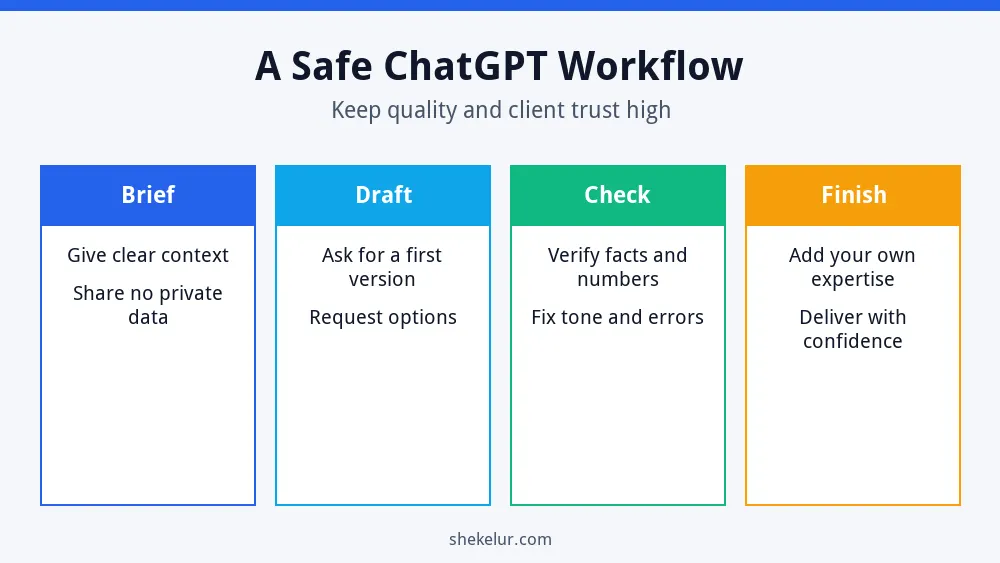
- Brief: give clear context and leave out private client details.
- Draft: ask for a first version or several options.
- Check: verify facts, numbers, names and quotes yourself.
- Finish: add your expertise, examples and personal voice.
Risks and Limits You Should Know
- Mistakes: AI can state wrong information with confidence, so always fact-check.
- Confidentiality: do not paste private client data, passwords or unpublished work unless your contract and the tool’s settings allow it.
- Originality: raw AI text can sound generic. Add your own insight.
- Client rules: some clients restrict or require disclosure of AI use. Read your contract.
- Ownership and licensing: rules vary, so check the tool’s terms and the law where you work.
If you write web content, note that Google’s guidance on using generative AI content says the focus is on helpful, original content, not on how it was produced. Using AI mainly to mass-produce pages to manipulate rankings can break its spam policies. For more, read whether AI writing tools can rank on Google.
Free vs Paid ChatGPT Plans
Start with the free option if it covers your needs. Plans, features and usage limits change often, so check the current details inside the app. Upgrade only when the limits slow down paid work, and judge the cost against the hours you save.
ChatGPT vs Other AI Tools
ChatGPT is not the only choice. Different assistants have different strengths, so test a few with your real tasks. My comparison of Claude vs ChatGPT for content writing and my list of the best AI writing tools in 2026 can help you decide.
Use ChatGPT to Win Clients, Not to Replace Yourself
Clients hire you for your judgment, taste and reliability. Use ChatGPT for the routine parts, then spend the saved time on research, strategy and communication. That is how you deliver better work in less time. Also keep your tools organized, and see my guide on how to choose productivity apps.
Clients judge you before they read your proposal. A simple portfolio site and professional business email on your own domain make a stronger first impression than a free inbox. Compare plans, billing terms and renewal prices before you buy.
Common Mistakes Freelancers Make With ChatGPT
- Delivering AI output without editing or fact-checking.
- Pasting confidential client information.
- Using vague prompts and accepting the first answer.
- Ignoring client rules about AI.
- Letting AI replace thinking instead of supporting it.
- Promising results that you cannot verify.
Final Thoughts on ChatGPT for Freelancers
ChatGPT for freelancers works best as a fast assistant, not an autopilot. Use it to draft, organize and learn, then apply your own expertise. Protect your clients’ data, check every fact and keep improving your prompts.
Your Next Step: Try One Workflow This Week
Pick one routine task, such as client emails or outlines, and test the safe workflow this week. If you need clients for your freelance services, or you would like to hire a specialist for work outside your skills, you can explore the marketplace on Fiverr. Read the platform rules and seller reviews carefully before you start.
Frequently Asked Questions
Can Freelancers Use ChatGPT for Client Work?
Often yes, but check your contract and the client’s rules. Always review the output, protect private data and be honest if disclosure is required.
Will ChatGPT Replace Freelancers?
It changes routine tasks, but clients still need judgment, creativity, accountability and relationships. Freelancers who use it well can stay competitive.
Is It Safe to Share Client Information With ChatGPT?
Avoid sharing confidential details unless your agreement and the tool’s data settings allow it. When in doubt, remove names and sensitive facts.
How Do I Make ChatGPT Sound Like Me?
Share a short sample of your writing and ask it to match the tone. Then edit the result yourself.
Which Freelance Jobs Benefit Most?
Writing, editing, research, marketing, customer support and project management often benefit, but any role with repeatable text tasks can save time.